
Download Alpha Icon Creator – icon creator, alpha channel, bitmap to icon, transparent icon, 32-bit icon, icon generator, icon maker, custom icon, icon design, icon tool
Overview
Alpha Icon Creator is a specialized productivity tool designed for users who require the ability to generate high-quality 32-bit icons with alpha channels from a single bitmap image. The application simplifies the creation of custom icons by streamlining the process into three intuitive steps, making it accessible even to users with minimal design experience. Its primary function is to convert standard bitmap images into professional-grade icons with smooth, blended edges through Alpha Resampling technology, ensuring visual clarity across different sizes and platforms.
Target users include graphic designers, software developers, and hobbyists who need to create icons for desktop applications, websites, or embedded systems. The tool is particularly useful for projects requiring transparency, such as UI elements or application launchers where a clean, borderless appearance is essential. By enabling transparent background options and multiple size outputs, Alpha Icon Creator supports a wide range of use cases, from small app icons to larger interface graphics.
Developed by Ryan J. Boudreaux and released on March 20, 2007, the application has maintained a niche presence in the productivity software ecosystem. Despite its age, it continues to serve as a lightweight solution for icon generation on Windows platforms. The developer did not provide additional technical details or updates beyond the initial release, and compatibility information was not fully disclosed.
Key Features & Functionality
- User-Friendly Interface: The interface is designed for simplicity and ease of navigation. Users can follow a clear workflow without needing prior design knowledge, allowing immediate access to icon creation tools.
- Alpha Resampling Technology: This feature ensures that when icons are downscaled, their edges remain smooth and blended, preserving image quality and avoiding jagged or pixelated results.
- Multiple Icon Sizes: Users can generate icons in various dimensions, allowing compatibility with different platforms and display resolutions, from standard desktop icons to high-DPI screens.
- Transparent Background Option: The tool supports the creation of icons with transparent backgrounds, which is crucial for seamless integration into diverse UI environments without visual artifacts.
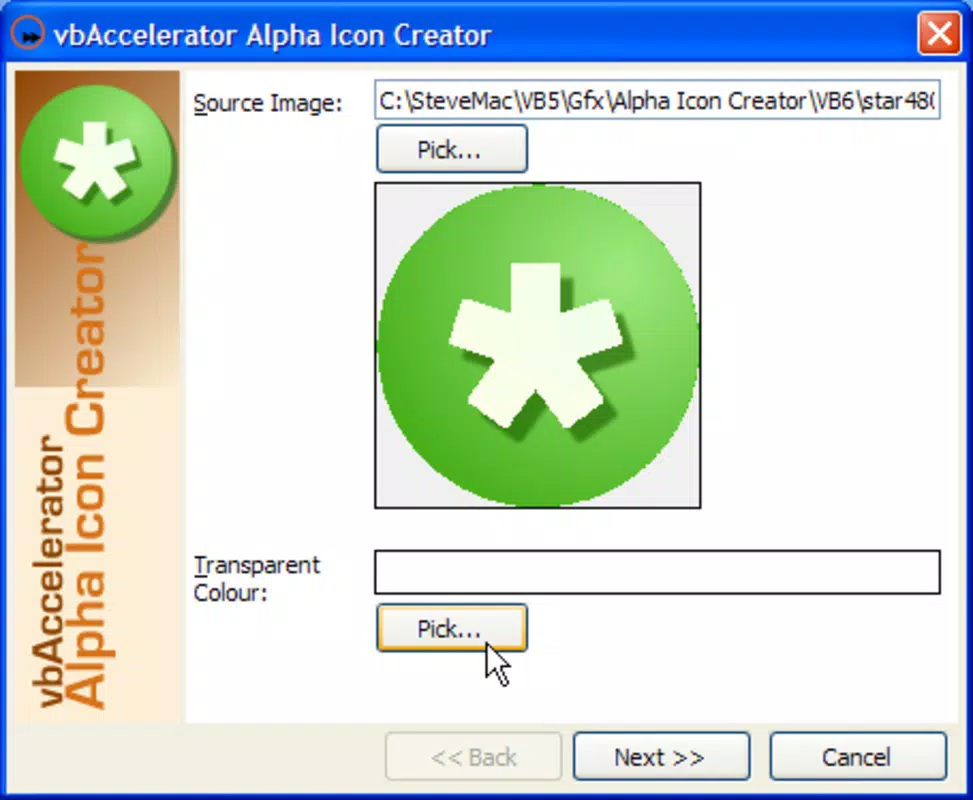
- Quick 3-Step Process: The workflow consists of selecting a bitmap image, choosing background color and desired sizes, then generating the output—minimizing time and effort for rapid icon production.
For example, a developer creating a desktop application can use a logo in PNG format, convert it to a 32-bit icon with transparency, and export it in multiple sizes for different system requirements—all within minutes. Similarly, a designer preparing assets for a mobile app can generate icon variants efficiently. The tool’s focus on precision and speed makes it a practical utility for users needing consistent, professional output.
Interface, UX & Performance
Alpha Icon Creator features a minimalistic interface with a clean layout focused on core functionality. Navigation is linear and straightforward, guiding users through each step of the icon creation process. The visual design prioritizes usability over aesthetics, which aligns with its utility-focused purpose. Buttons and input fields are logically arranged, reducing cognitive load and minimizing user errors.
Although the developer did not list formal performance metrics, the application’s small file size of 1.2 MB suggests it is lightweight and optimized for low-resource environments. It is expected to run efficiently on older or entry-level Windows systems. Responsiveness appears to be consistent, as the tool processes image conversion without noticeable lag during typical use cases.
Stability is implied by the application’s long-standing presence, though no user reports or crash statistics were provided. The lack of recent updates may raise concerns about modern OS compatibility, but the tool remains functional within its intended scope. Users should be aware that support for newer Windows versions has not been confirmed.
Platform Compatibility & Technical Requirements
Alpha Icon Creator is designed for the Windows platform. The software version is 1.0.0, and the file size is 1.2 MB. The developer did not specify minimum OS requirements or compatibility with specific Windows versions beyond the platform designation.
Given the release date of March 20, 2007, the application was originally built for older Windows operating systems such as Windows XP or Vista. While it may still run on modern systems through compatibility modes, official support for current Windows versions has not been confirmed. Users are advised to test the application in their environment before relying on it for critical tasks.
Specific hardware requirements were not listed. However, the small file size indicates low memory and processing demands, suggesting broad compatibility with standard desktop configurations.
Pros and Cons
Pros
- Free to download and use, making it accessible to all users.
- Simple, three-step workflow ideal for beginners and quick tasks.
- Supports transparent backgrounds for versatile icon usage.
- Uses Alpha Resampling to maintain edge quality during scaling.
- Lightweight with a minimal footprint of only 1.2 MB.
Cons
- Released in 2007; no recent updates or official support.
- Compatibility with modern Windows versions not confirmed.
- Limited to Windows platform; no availability for Android or iOS.
- Developer did not provide detailed technical specifications or system requirements.
- No built-in preview or batch processing features were mentioned.
FAQ
Is Alpha Icon Creator safe to download?
The application is free and available from its original developer. However, users should exercise caution when downloading software from older sources and ensure they scan the file with up-to-date antivirus tools.
Can I use Alpha Icon Creator on Windows 10 or 11?
While the tool was released in 2007, it may run on newer Windows systems using compatibility mode. However, official support for Windows 10 or 11 has not been confirmed by the developer.
Does Alpha Icon Creator support batch processing?
Based on the provided information, the tool does not list batch processing capabilities. Each icon must be created individually through the three-step process.
Is the app available for Android or iOS?
No. The application is only available for Windows. There is no official version for Android or iOS devices.
How do I install Alpha Icon Creator?
Download the installer file, run it, and follow the on-screen instructions. The process is straightforward and requires no advanced technical knowledge.
Final Thoughts
Alpha Icon Creator remains a reliable, no-frills solution for generating 32-bit icons with alpha channels from bitmap images. Its lightweight design, transparent background support, and efficient workflow make it a valuable tool for developers and designers needing custom icons without the complexity of full-featured design software. While the lack of updates and modern compatibility may be a concern, its core functionality remains intact for users on older or stable Windows environments.
For those seeking a free, simple, and effective icon creation utility on Windows, this tool delivers consistent results with minimal effort. It’s especially beneficial for users who prioritize speed and simplicity over advanced features.
Download Alpha Icon Creator now


